Feature Concept
Windows/macOS New Feature — “Groups in Taskbar/Dock”

Overview
I have been using both Windows and macOS for a long time, and recently, while using my smartphone, I noticed something interesting. On a smartphone, you can create folders on the homepage by grouping apps together, making the screen look cleaner and more organized. This got me thinking — why don’t we have a similar feature for the Windows taskbar and macOS dock? (Following the Jacobs Law). So, here’s my analysis of this potential “Groups in Taskbar/Dock” feature.
Process
User Research
- As always, the first step of this design process was to do a user research. I started by searching for information about how users currently organize their taskbar and dock, and I found that many users use shortcuts to organize their taskbar and dock. This led me to the idea of creating a new feature that allows users to create groups on their taskbar and dock, similar to how they can create folders on their smartphone homepage.
- Then I created user personas to represent the different types of users who might benefit from this feature. After that I create user stories to understand the user's journey and pain points.
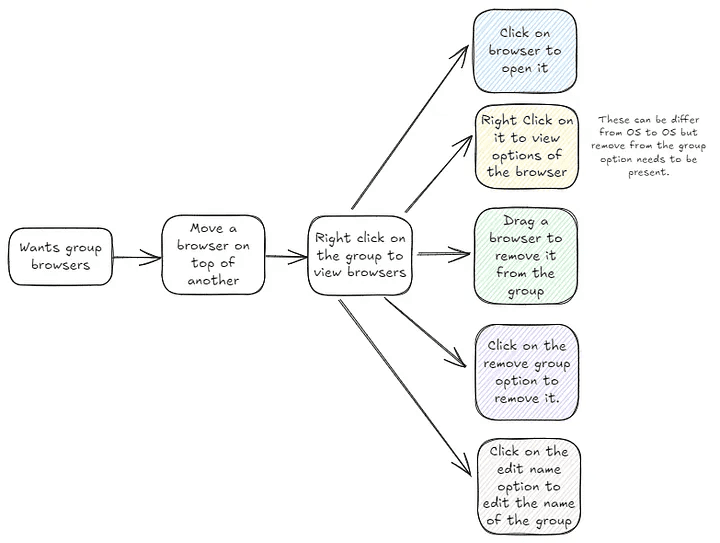
- After that I created a user flow or a user journey map to understand the possible scenarios and the user's actions.
Wireframing
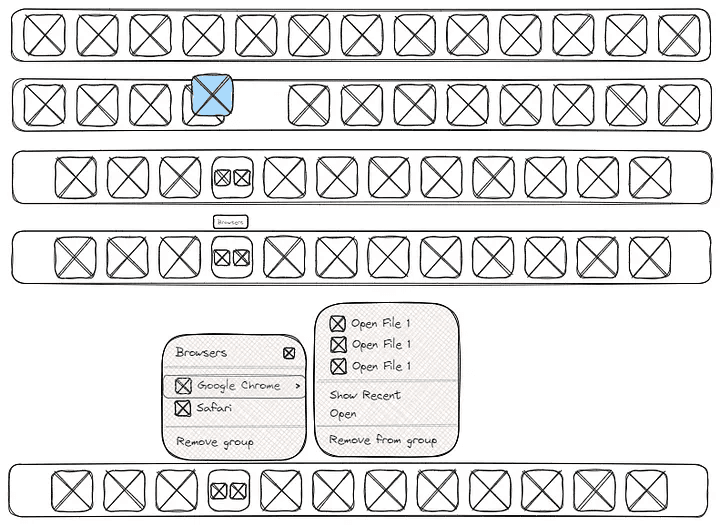
- From the information gathered from the user research, I created wireframes to visualize the user journey and identify areas for improvement. For this I used Excalidraw because it is a free tool that allows me to quickly and easily create wireframes
For More Information
I have written a detailed blog post about this new feature idea, which you can read from the link below.